
This notebook introduces linear optimization (LO), also called linear programming. It is a widely used optimization framework in practice: efficient solvers exist that are guaranteed to find the optimum even for problems with thousands of variables and constraints. We introduce it through an example, model it, solve it in Python with pulp, look at what the solver is doing both graphically and algebraically, and see what can go wrong.
Learning outcomes
On completion of this notebook, you will be able to:
formulate a real-life decision problem as an LO model (decision variables, objective, constraints);
implement an LO model in pulp, both directly and with the data kept separate from the model;
understand the intuition behind the simplex method;
interpret an LO solution both graphically and algebraically;
recognize infeasibility and unboundedness in pulp’s solve status.
A Motivating Problem: Optimal Product Mix¶
A good way to introduce LO is through a concrete example. Consider a workshop that makes two products, bookcases and desks, from two limited resources, oak panels and assembly hours. The following information is known per unit of product:
| product | profit (€) | oak panels needed | assembly hours needed |
|---|---|---|---|
| bookcase | 3 | 1 | 2 |
| desk | 5 | 3 | 1 |
For example, creating 2 bookcases creates a profit of 6 and requires 2 oak panels and 4 assembly hours. There are 12 oak panels and 10 assembly hours available this week. The optimization problem is to find the product mix that maximizes profit this week. For simplicity, we assume continuous amounts of bookcases and desks can be made; Integer Optimization revisits this example with the added requirement that only whole numbers are allowed.
The Modeling Approach¶
We follow the same four steps for every problem in this course:
study the problem in detail (done above);
define the decision variables: let and be the number of bookcases and desks produced, respectively;
define the objective: maximize profit, ;
define the constraints: the oak-panel usage, , cannot exceed 12; the assembly-hour usage, , cannot exceed 10; and .
In mathematical form:
The objective and all constraints are linear functions of the decision variables , hence the name linear optimization.
Solving the Model Directly in pulp¶
For a small, one-off model like this, the fastest way from model to answer is to write it in pulp exactly as it appears above, with the numbers typed directly into the variable bounds and constraints. We walk through it step by step; each step maps onto one of the four modeling steps above.
Import pulp¶
pulp is the Python package we use to build and solve LO (and, later, ILO) models. Let’s import it.
import plotly.graph_objects as go
import pulp
Introduce the LP Problem¶
Python class LpProblem is pulp’s container for a model: give it a name and a sense
(LpMaximize or LpMinimize) upon initialization.
product_mix = pulp.LpProblem(name="product_mix", sense=pulp.LpMaximize)Specify the Decision Variables (step 2)¶
Each decision variable becomes an LpVariable object; lowBound=0 encodes . Optionally, we can set cat by giving a string that specifies the variable type, for example "Continuous", "Integer", or "Binary" (resulting in LpContinuous, LpInteger, or LpBinary, respectively). By default, LpVariable is continuous; we will see integer variables in Integer Optimization. Optionally, an upBound can be specified.
x = pulp.LpVariable(name="x", lowBound=0)
y = pulp.LpVariable(name="y", lowBound=0)
Specify the Objective Function (step 3)¶
Add the objective to the problem with +=; the optional string names it for pulp’s
output.
product_mix += 3 * x + 5 * y, "profit"Specify the Constraints (step 4)¶
Constraints are added the same way, one += call per constraint. The comparison operators <=, >=, and == signify that a constraint is added (and not an objective).
product_mix += x + 3 * y <= 12, "oak_panels"
product_mix += 2 * x + y <= 10, "assembly_hours"
Printing the Model¶
For small models, it is often useful to print the model to check that it was built correctly. pulp’s print() method produces a human-readable version of the model.
print(product_mix)product_mix:
MAXIMIZE
3*x + 5*y + 0
SUBJECT TO
oak_panels: x + 3 y <= 12
assembly_hours: 2 x + y <= 10
VARIABLES
x Continuous
y Continuous
Solve and Check the Results¶
We are ready to solve the LO problem. We first load a solver and then use it in .solve(); LpStatus reports whether it found an optimum, and .value() reads off the variables and the objective.
product_mix.solve(pulp.PULP_CBC_CMD(msg=False))
print("status:", pulp.LpStatus[product_mix.status])
print(f"x = {x.value()}, y = {y.value()}")
print("optimal profit:", product_mix.objective.value())
status: Optimal
x = 3.6, y = 2.8
optimal profit: 24.8
Separating Data from the Model¶
The direct version above hardcodes every number into the model itself, which is fine for a (small) problem you solve once. It breaks down as soon as you want to re-solve for different data (more products, different resource limits) or reuse the same model code elsewhere: every number would have to be found and edited inside the model-building code, which is slow and error-prone. The fix is to keep the instance data in plain Python structures, separate from the model-building code, and build the model from that data:
# data
profit = {"bookcase": 3, "desk": 5}
# resource_use[res][p]: units of resource res per unit of product p
resource_use = {
    "oak panels": {"bookcase": 1, "desk": 3},
    "assembly hours": {"bookcase": 2, "desk": 1},
}
available = {"oak panels": 12, "assembly hours": 10}
products = list(profit)

# modeling
product_mix = pulp.LpProblem(name="product_mix", sense=pulp.LpMaximize)
dec_vars = {p: pulp.LpVariable(name=p, lowBound=0) for p in products}

product_mix += pulp.lpSum(profit[p] * dec_vars[p] for p in products), "profit"
for res, cap in available.items():
    usage = pulp.lpSum(resource_use[res][p] * dec_vars[p] for p in products)
    product_mix += usage <= cap, res.replace(" ", "_")

# solving the model and printing the results
product_mix.solve(pulp.PULP_CBC_CMD(msg=False))
mix_solution = {p: dec_vars[p].value() for p in products}
optimal_profit = product_mix.objective.value()
print("status:", pulp.LpStatus[product_mix.status])
print("optimal mix:", mix_solution)
print("optimal profit:", optimal_profit)
status: Optimal
optimal mix: {'bookcase': 3.6, 'desk': 2.8}
optimal profit: 24.8
The model-building code (the for loop and the pulp.lpSum calls) no longer mentions 3,
5, 12, or 10 anywhere: it works unchanged for any number of products and resources, as
long as profit, resource_use, and available describe them. This is the pattern we
use for every larger model from here on, and it is also the discipline behind the
algebraic modeling languages (AMLs) that
were used for optimization models before Python libraries like pulp.
A Larger Example in pulp¶
The same three ingredients, and the same data/model split, scale to any size. Suppose the workshop adds a third product, chairs, that uses 2 oak panels and 1 assembly hour per unit and earns a profit of 4 per unit, and that both resources become a bit more plentiful: 15 oak panels and 18 assembly hours. Only the data changes; the model-building code stays exactly the same as in the previous section:
# data
profit = {"bookcase": 3, "desk": 5, "chair": 4}
# resource_use[res][p]: units of resource res per unit of product p
resource_use = {
    "oak panels": {"bookcase": 1, "desk": 3, "chair": 2},
    "assembly hours": {"bookcase": 2, "desk": 1, "chair": 1},
}
available = {"oak panels": 15, "assembly hours": 18}
products = list(profit)

# modeling
product_mix = pulp.LpProblem(name="product_mix", sense=pulp.LpMaximize)
dec_vars = {p: pulp.LpVariable(name=p, lowBound=0) for p in products}

product_mix += pulp.lpSum(profit[p] * dec_vars[p] for p in products), "profit"
for res, cap in available.items():
    usage = pulp.lpSum(resource_use[res][p] * dec_vars[p] for p in products)
    product_mix += usage <= cap, res.replace(" ", "_")

# solving the model and printing the results
product_mix.solve(pulp.PULP_CBC_CMD(msg=False))
print("status:", pulp.LpStatus[product_mix.status])
print("optimal mix:", {p: dec_vars[p].value() for p in products})
print("optimal profit:", product_mix.objective.value())
status: Optimal
optimal mix: {'bookcase': 7.0, 'desk': 0.0, 'chair': 4.0}
optimal profit: 37.0
The model-building code is a line-for-line copy of the two-product version; only the data changed.
A Graphical View¶
With only two decision variables we can draw the product-mix problem. Each constraint is a line; the feasible region is the set of points satisfying all of them at once. Because both the constraints and the objective are linear, the objective-value contour lines are straight and parallel. Sliding one in the direction of increasing profit, the last feasible point it touches is an optimal solution. Indeed, this may be a line segment if the objective function is parallel to a constraint. However, there is always a corner point of the feasible region that is optimal.
Use the figure below to check your hand drawing, which you do need to master. Hover over a corner point of the feasible region to see its coordinates and profit.
Figure 1:Feasible region of the product-mix problem with two objective contour lines: the dotted line has profit 15, the solid line the optimal profit 24.8, touching the region only in the optimum (3.6, 2.8). Hover over a corner point to see its coordinates and profit.
The dotted grey line (profit 15) still has feasible points but we can do better; sliding it out until it just leaves the feasible region gives the solid line, which touches the region only at the corner where the two resource constraints meet: the optimum pulp reported above.
An Algebraic View¶
The same optimum can be understood without a picture. Turn each “” constraint into an equality by adding a non-negative slack variable, the amount of the resource left unused:
is the number of oak panels left unused, and is the number of assembly hours left unused. There are now 2 equations and 4 variables. As a rule, a system of independent linear equations in unknowns has generally one solution, so if we set any 2 of the 4 variables to zero the other 2 are determined (where the two lines corresponding to the equations cross). Each such choice corresponds to a corner of the feasible region (some combinations give a negative value and are infeasible; those are corners of the lines’ intersections that lie outside the feasible region). The corners here are:
: the origin;
: assembly hours fully used;
: oak panels fully used;
: both resource constraints tight, the optimum.
The simplex algorithm (G.B. Dantzig, 1947), which pulp’s default solver uses for LO, hops from corner to neighboring corner, each time to one with a better objective value, and stops when no neighboring corner is better. Why is that enough to guarantee the global optimum? Because the feasible region of an LO problem is a convex polyhedron: a shape with flat faces and no hidden “hills”. If every neighbor of your current corner is worse, there is nowhere higher to go, since reaching a higher point would require the boundary to curve, and linear constraints never curve. So for LO, a local optimum is automatically a global optimum.
Three Possible Outcomes¶
Not every LO problem has an optimal solution. There are exactly three possibilities:
an optimal solution exists (the case above);
unbounded: solutions of arbitrarily large objective value exist. This cannot happen for the product-mix problem above, since every product uses some of both resources, but it can happen in general whenever some variable is left unconstrained, for example if the workshop also sold a service that used neither oak panels nor assembly hours;
infeasible: no point satisfies all constraints. This happens if, for example, a customer contract forces while the oak-panel constraint allows at most .
pulp reports these as the LpStatus values "Unbounded" and "Infeasible" instead of
"Optimal". Figure 2 shows both situations schematically.
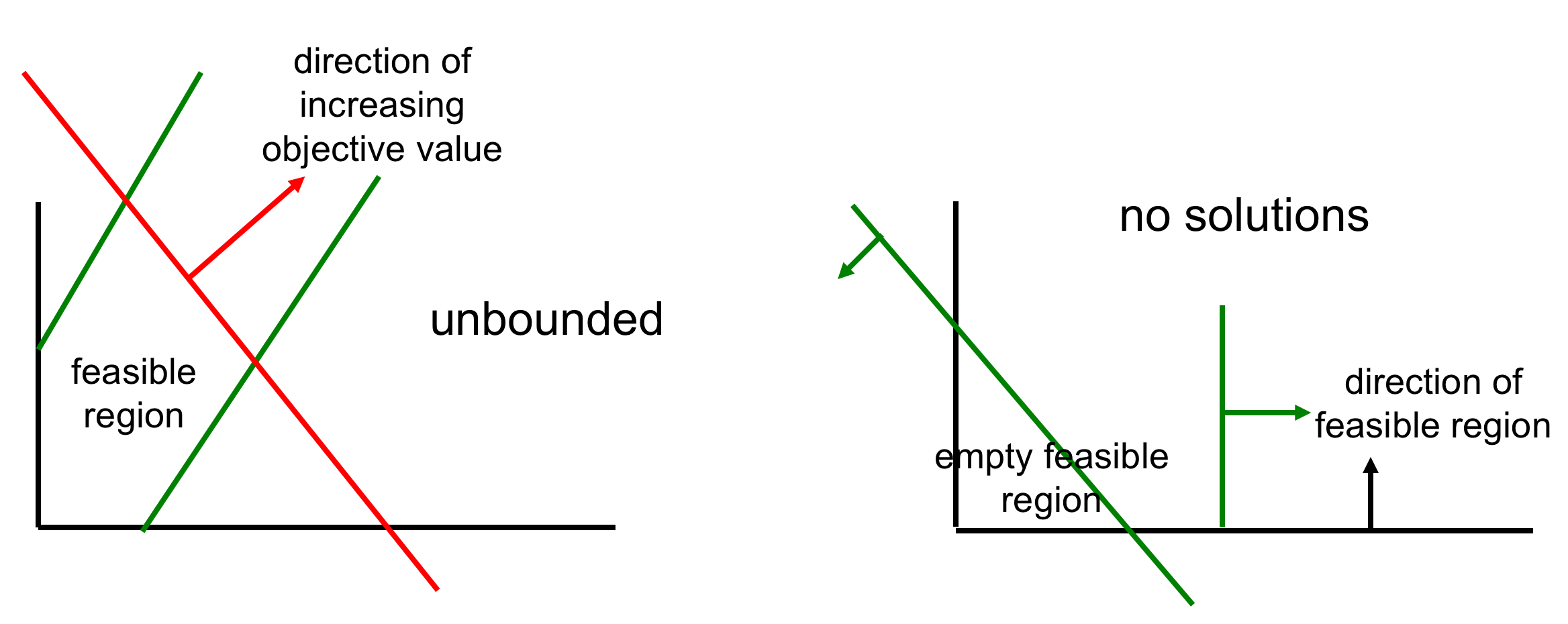
Figure 2:An unbounded (left) and an infeasible (right) LO problem.
In the following we illustrate the unbounded and infeasible errors in pulp for the product-mix problem. For unboundedness, we add a third variable that uses no resources at all; for infeasibility, we add a customer contract that requires :
unbounded_lp = pulp.LpProblem(name="unbounded_example", sense=pulp.LpMaximize)
x = pulp.LpVariable(name="x", lowBound=0)
y = pulp.LpVariable(name="y", lowBound=0)
s = pulp.LpVariable(
    name="s", lowBound=0
)  # a hypothetical service, no resources needed
unbounded_lp += 3 * x + 5 * y + 1 * s
unbounded_lp += x + 3 * y <= 12
unbounded_lp += 2 * x + y <= 10
# no constraint at all limits s

unbounded_lp.solve(pulp.PULP_CBC_CMD(msg=False))
print("status:", pulp.LpStatus[unbounded_lp.status])
status: Unbounded
infeasible_lp = pulp.LpProblem(
    name="infeasible_example", sense=pulp.LpMaximize
)
x = pulp.LpVariable(name="x", lowBound=0)
y = pulp.LpVariable(name="y", lowBound=0)
infeasible_lp += 3 * x + 5 * y
infeasible_lp += x + 3 * y <= 12
infeasible_lp += 2 * x + y <= 10
infeasible_lp += y >= 5  # the customer contract

infeasible_lp.solve(pulp.PULP_CBC_CMD(msg=False))
print("status:", pulp.LpStatus[infeasible_lp.status])
status: Infeasible
Another Application: Project Planning¶
A graph is a network of nodes (also called vertices) connected by edges; a directed edge is called an arc. Many problems are naturally expressed on graphs. One is project planning: a project has activities (nodes), each with a duration, and precedence relations (arcs). An activity can only start once its predecessors are finished (you cannot roof a house before the walls are up).
| activity | duration | must follow |
|---|---|---|
| A | 3 | none |
| B | 4 | none |
| C | 2 | A |
| D | 5 | A, B |
| E | 1 | C, D |
| F | 3 | D |
Let be the finish time of activity . If precedes then , where is the duration of ; also . We want the time when all activities are finished, . That maximum is not linear (question to yourself: why not?), but we can introduce a variable for all and minimize : the optimization will push down to exactly the largest finish time. This “min-max” trick reappears throughout the course.
duration = {"A": 3, "B": 4, "C": 2, "D": 5, "E": 1, "F": 3}
precedences = [
    ("A", "C"),
    ("A", "D"),
    ("B", "D"),
    ("C", "E"),
    ("D", "E"),
    ("D", "F"),
]
project = pulp.LpProblem(name="project_planning", sense=pulp.LpMinimize)
finish = {
a: pulp.LpVariable(name=f"x_{a}", lowBound=duration[a]) for a in duration
}
makespan = pulp.LpVariable(name="z", lowBound=0)
for a in duration:
project += makespan >= finish[a]
for before, after in precedences:
project += finish[before] + duration[after] <= finish[after]
# minimize z; the tiny extra term only breaks ties, so activities that
# have slack still get their *earliest* finish time reported instead of an
# arbitrary one consistent with z.
project += makespan + 1e-4 * pulp.lpSum(finish[a] for a in duration)
project.solve(pulp.PULP_CBC_CMD(msg=False))
print(
"earliest finish times:",
{a: round(finish[a].value(), 2) for a in duration},
)
print("project finish time (makespan):", makespan.value())earliest finish times: {'A': 3.0, 'B': 4.0, 'C': 5.0, 'D': 9.0, 'E': 10.0, 'F': 12.0}
project finish time (makespan): 12.0
The finish time can also be found by a direct algorithm without LO, and that algorithm extends to random durations, which matters because durations are often hard to predict, one reason IT projects overrun.
References¶
Koole, G. (2019). An Introduction to Business Analytics. §6.1 “Problem Formulation”, §6.3 “Example LO Problems” (project planning).